Exploring AI Coding Assistants: Claude Vibe, Kimi Vibe, Gemini Vibe, and Mistral Vibe
In the rapidly evolving world of AI-powered development tools, several coding assistants have emerged to help developers write, debug, and optimize code more efficiently. Among these are Claude Vibe, Kimi Vibe, Gemini Vibe, and Mistral Vibe. Each of these tools offers unique features and capabilities tailored to enhance the coding experience. In this blog post, we'll explore what each of these tools brings to the table and how they can be leveraged in your development workflow.
1/12/20263 min read
Claude Vibe
Overview
Claude Vibe is an AI-powered coding assistant designed to integrate seamlessly into your development environment. It leverages advanced natural language processing to understand and generate code, making it a versatile tool for developers of all skill levels.
Key Features
Code Generation: Claude Vibe can generate code snippets based on natural language prompts, helping you quickly implement functionality without extensive manual coding.
Code Completion: It provides intelligent code completion suggestions, reducing the time spent on writing boilerplate code.
Debugging Assistance: Claude Vibe can identify potential bugs and suggest fixes, making the debugging process more efficient.
Multi-Language Support: It supports a wide range of programming languages, making it suitable for diverse projects.
Use Cases
Rapid prototyping of new features
Automating repetitive coding tasks
Enhancing code quality through intelligent suggestions
Kimi Vibe
Overview
Kimi Vibe is another powerful AI coding assistant that focuses on enhancing developer productivity through intelligent code analysis and generation. It is designed to be highly responsive and adaptable to various coding styles and preferences.
Key Features
Context-Aware Suggestions: Kimi Vibe provides suggestions based on the context of your code, ensuring that the recommendations are relevant and useful.
Real-Time Collaboration: It supports real-time collaboration features, allowing multiple developers to work together seamlessly.
Customizable Workflows: Kimi Vibe can be customized to fit into your existing workflows, making it a flexible tool for different development environments.
Integration with Popular IDEs: It integrates with popular Integrated Development Environments (IDEs), providing a smooth user experience.
Use Cases
Collaborative coding sessions
Customizing development workflows
Integrating AI assistance into existing IDEs
Gemini Vibe
Overview
Gemini Vibe is an AI coding assistant that emphasizes simplicity and ease of use. It is designed to be user-friendly, making it accessible to developers who may not have extensive experience with AI tools.
Key Features
User-Friendly Interface: Gemini Vibe offers a straightforward and intuitive interface, making it easy to get started with AI-assisted coding.
Automated Code Reviews: It can perform automated code reviews, identifying potential issues and suggesting improvements.
Learning and Adaptation: Gemini Vibe learns from your coding patterns and adapts its suggestions to better fit your style over time.
Extensive Documentation: It comes with comprehensive documentation and tutorials, making it easy to learn and use.
Use Cases
Automating code reviews
Learning and adapting to individual coding styles
Providing extensive documentation and support
Mistral Vibe
Overview
Mistral Vibe is a robust AI coding assistant that focuses on providing advanced code analysis and optimization capabilities. It is designed to help developers write more efficient and maintainable code.
Key Features
Advanced Code Analysis: Mistral Vibe offers in-depth code analysis, helping you identify performance bottlenecks and potential issues.
Code Optimization: It provides suggestions for optimizing your code, improving both performance and readability.
Multi-Language Support: Mistral Vibe supports a wide range of programming languages, making it suitable for diverse projects.
Integration with CI/CD Pipelines: It can be integrated into your Continuous Integration/Continuous Deployment (CI/CD) pipelines, ensuring that your code is always optimized and error-free.
Use Cases
Optimizing code for performance and readability
Integrating AI assistance into CI/CD pipelines
Analyzing and improving code quality
Comparison
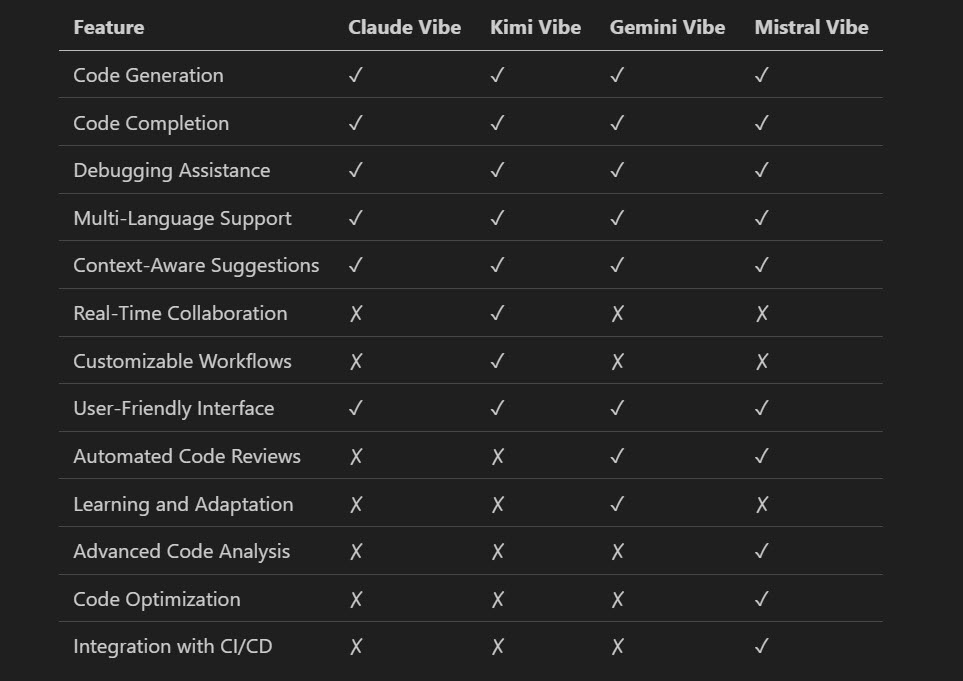
Feature Comparison
Strengths and Weaknesses
Claude Vibe: Strengths in code generation and debugging assistance. Weaknesses in real-time collaboration and customizable workflows.
Kimi Vibe: Strengths in context-aware suggestions and real-time collaboration. Weaknesses in advanced code analysis and optimization.
Gemini Vibe: Strengths in user-friendly interface and automated code reviews. Weaknesses in advanced code analysis and integration with CI/CD.
Mistral Vibe: Strengths in advanced code analysis and optimization. Weaknesses in real-time collaboration and customizable workflows.
Conclusion
Each of these AI coding assistants—Claude Vibe, Kimi Vibe, Gemini Vibe, and Mistral Vibe—offers unique features and capabilities that can significantly enhance your development workflow. Depending on your specific needs and preferences, you may find one tool more suitable than the others. Whether you prioritize code generation, real-time collaboration, user-friendly interfaces, or advanced code analysis, there is an AI coding assistant that can meet your requirements.
By leveraging the power of these AI tools, you can streamline your coding process, improve code quality, and ultimately become a more efficient and effective developer.
Further Reading
Happy coding! 🚀